Earlier this year, I quit my job at Logitech. As part of that, I was put on garden leave, which gave me some time to work on a larger project.
My kids had been telling me about places where they can play with LEGO and other things—and just leave everything set up for a few days without turning our home upside down. Meanwhile, we still had our attic, which we were only using for storage—not exactly the most efficient use of space.
The attic was already insulated but lacked a proper setup and decent lighting. So I decided to fix that. I added wood paneling to the walls, installed cork floor tiles, and put in bright lighting. And of course, it also needed proper networking.
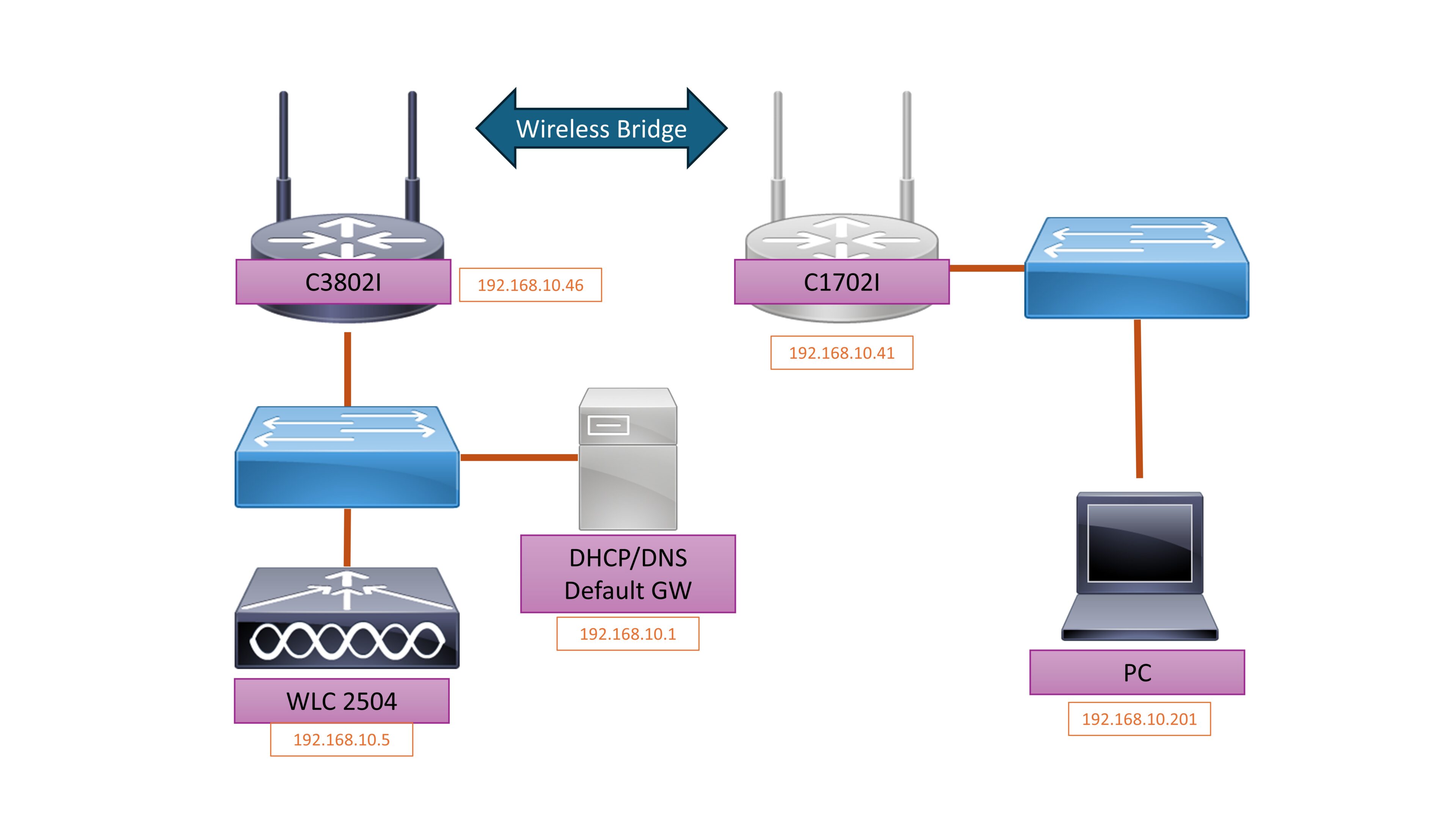
Since there was no network wiring to the attic, I had to choose between a wireless or a powerline solution. I opted for wireless.
I already run a trustworthy WLC 2504 in my basement, with four access points connected throughout the house, so Wi-Fi coverage is pretty solid. But I still wanted a wired option in the attic, so I could connect older AV equipment and other devices to the network.
I thought, “How hard can it be to set up an access point as a bridge?”
Oh boy… that turned into quite the journey.
AP conversion
I had to convert a 1702 access point to Autonomous mode so it could act as a client to the WLC’s APs. Since I’ve done this in the past, the upgrade itself wasn’t too painful.
That said, I still had to get my hands on the right image and flash it via TFTP… good old days.
AP configuration
All I really needed was to connect an AP to the WLC’s APs and bridge the LAN port to the Wi-Fi interface… how hard could it be?
I used a mix of ChatGPT and Cisco guides to come up with a sensible configuration. It almost worked—but the AP just wouldn’t connect to the Wi-Fi.
As it turns out, there’s a “magical” command on the WLC, along with a few very specific settings, that make it all come together. Neither ChatGPT nor the official guides pointed me in the right direction.
But Perplexity did!
So there is the configuration of the AP:
version 15.3
no service pad
service timestamps debug datetime msec
service timestamps log datetime msec
service password-encryption
!
hostname Dackstock
!
!
logging rate-limit console 9
enable secret 5 xxxxxxxxxxxxxx
!
no aaa new-model
no ip source-route
no ip cef
!
dot11 pause-time 100
dot11 syslog
!
dot11 ssid MYSSID
authentication open
authentication key-management wpa version 2
infrastructure-ssid
wpa-psk ascii 7 xxxxxxxxxxxxxx
!
bridge irb
!
interface Dot11Radio0
no ip address
shutdown
antenna gain 0
station-role root
bridge-group 1
bridge-group 1 subscriber-loop-control
bridge-group 1 spanning-disabled
bridge-group 1 block-unknown-source
no bridge-group 1 source-learning
no bridge-group 1 unicast-flooding
!
interface Dot11Radio1
no ip address
no ip route-cache
encryption mode ciphers aes-ccm
!
ssid MYSSID
antenna gain 0
peakdetect
station-role workgroup-bridge
infrastructure-client
bridge-group 1
bridge-group 1 spanning-disabled
!
interface GigabitEthernet0
no ip address
duplex auto
speed auto
bridge-group 1
bridge-group 1 spanning-disabled
!
interface BVI1
mac-address 5c83.8fa6.7da0
ip address dhcp client-id GigabitEthernet0
ip helper-address 192.168.10.1
ipv6 enable
!
ip forward-protocol nd
!
bridge 1 route ip
!
line con 0
line vty 0 4
login local
transport input all
!
end
Configuration on the WLC 2504
Allow WGB clients on this WLAN
On 2504 CLI (SSH/console):
    - `config wgb vlan enable`;(enables wired client support behind WGBs globally). https://rscciew.wordpress.com/tag/workgroupbridge/

- Ensure “Aironet IE” support is enabled for the WLAN (Advanced tab: “Allow CCX Aironet IE” or similar). This is needed for proper WGB operation.https://www.cisco.com/c/en/us/td/docs/wireless/controller/ewc/17-8/config-guide/ewc_cg_17_8/ewc_cg_17_2_chapter_01001000.pdf
With all that in place, the AP connects to the Wifi and bridges all trafic as expected. The AP get’s the IP from the DHCP server, and relays the DHCP requests from the clients to the DHCP-Server. So now I have wired internet in the atic.